Desktop calculator - DesktopCalc2.1.61
Publisher Description
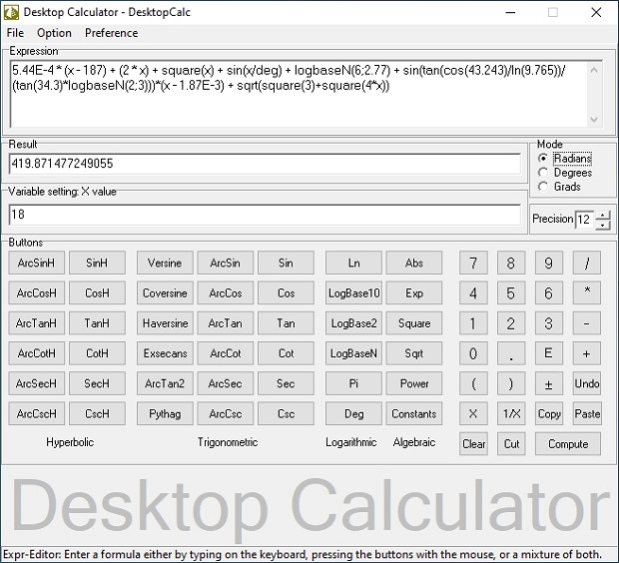
DesktopCalc is an enhanced, easy-to-use and powerful scientific calculator with an expression editor, printing operation, result history list and integrated help. DesktopCalc gives students, teachers, scientists and engineers the power to find values for even the most complex equation set.
DesktopCalc uses Advanced DAL (Dynamic Algebraic Logic) mechanism to perform all its operation with the built-in 38-digit precision math emulator for high precision.
DesktopCalc combines fast "just-one-click" interface with broad set of functions. It was designed as a tool that is convenient for both elementary and scientific calculator. DesktopCalc features include the following:
* Possibility to enter mathematical formulas as with a keyboard as with built-in button-panels.
* Scientific calculations - unlimited expression length
* Syntax highlight of math expression and proper operator precedence
* Parenthesis compatible
* Scientific notation
* Calculation range:
- maximal positive number: 1.797E+308
- minimal positive number: 2.225E-308
* All functions, mathematical and physical constants can also be used in expression
- 40 trigonometric, logarithmic, hyperbolic and algebraic functions
- 50 built-in most common mathematical and physical constants
* Clipboard smart functionality
- Cut, Copy and Paste operations
About Desktop calculator - DesktopCalc
This Mathematics program is available in English. It was last updated on 02 November, 2026. Desktop calculator - DesktopCalc is compatible with the following operating systems: Other, Windows.
The company that develops Desktop calculator - DesktopCalc is Institute of Mathematics and Statistics. The latest version released by its developer is 2.1.61. This version was rated by 6 users of our site and has an average rating of 4.7.
The download we have available for Desktop calculator - DesktopCalc has a file size of 3.1 MB. Just click the green Download button above to start the downloading process. The program is listed on our website since 2025-06-05 and was downloaded 411 times. We have already checked if the download link is safe, however for your own protection we recommend that you scan the downloaded software with your antivirus. Your antivirus may detect the Desktop calculator - DesktopCalc as malware if the download link is broken.
How to install Desktop calculator - DesktopCalc on your Windows device:
- Click on the Download button on our website. This will start the download from the website of the developer.
- Once the Desktop calculator - DesktopCalc is downloaded click on it to start the setup process (assuming you are on a desktop computer).
- When the installation is finished you should be able to see and run the program.
Program Details
System requirements
Download information
Pricing
Version History
version 2.1.61
posted on 2025-06-05
Dynamic functions for larger interger incorporated into the program.
version 2.1.60
posted on 2025-02-25
Various updates to underlying Library
version 2.1.59
posted on 2025-01-01
Updated user manual in application (with context help)
version 2.1.58
posted on 2024-08-13
Major restructuring of the calculating algorithms.
version 2.1.57
posted on 2024-05-18
For optimum performance, the underlying algorithms and functions are reshuffled.
version 2.1.56
posted on 2024-03-24
User interface improvements.
version 2.1.55
posted on 2024-01-04
Applications internal structural modification and optimization.
version 2.1.54
posted on 2023-09-17
Enhanced user manual in application (with context help)
version 2.1.53
posted on 2023-06-25
Reduced memory usage
version 2.1.52
posted on 2023-02-19
Higher precision improvements
